Showing posts with label Software. Show all posts
Time Stopper Download and Using process
 Time stopper - Stop time for each try-out version software and use them forever. Time Stopper help you to run trial version software without expiration. Time Stopper - Download and using process is an awesome article that shows how to download and use Time Stopper. So Time Stopper use to run trial version software forever.If you want to know how to use Time Stopper, just follow these article.
Contents
1. Time Stopper ??
Time Stopper is a popular utility which help you to run trial software without expiration.Function of the time stopper is to change the date and time by entering into the software. For this reason time stopper will extend the trial period of the program for an unlimited amount of time.
Time Stopper will not modify the time and date of the operating system.
2. Technical details of Time Stopper
Software Name : Time StopperSoftware Version : 4.0
License : Free software
File size : 2.25 MB.
Requirement : Windows 2000 and update any version.
Publisher : Time stopper.
3. Advantages of Time stopper
1. Time Stopper is a free software.2. Time Stopper easily installable
3. Time Stopper are not damaging any file
4. Run trial software without expiration.
5. Anti virus can't detect or blocked Time Stopper 4.0 as a virus.
4. Anti virus report for Time Stopper
AVG anti virus detect Time Stopper as contains virus. But new version of Time Stopper (4.0) fixed this false positive hits. Now anti virus can't blocked Time Stopper so enjoy!5. Screen Shots of Time Stopper
Screen shots of Time Stopper is given in below:
6. Time Stopper Download
To download Time Stopper 4.02 click on the below Time stopper download link:Time Stopper 4.02 Download
7. How to install Time Stopper ?
The Time Stopper installation took only a few minutes. The installation process is very easy and similar to other software. So try it yourself to install Time Stopper, if you have any problem then comment in below.8. How to use Time Stopper software ?
Time Stopper will stop the trial time when it is used. If the trial period has already ended, it is of no use to use Time Stopper as it will not be able to reverse the time.Steps to use Time Stopper:
Using Time Stopper is quite easy just follow these easy steps to use trial software forever:.- 1. User left click on "Browse... (push button)" in "Time Stopper". Browse your installed trial version software in --> windows drive >> Program Files >> then find out your installed trial version software and choose that .exe file which will run your program.
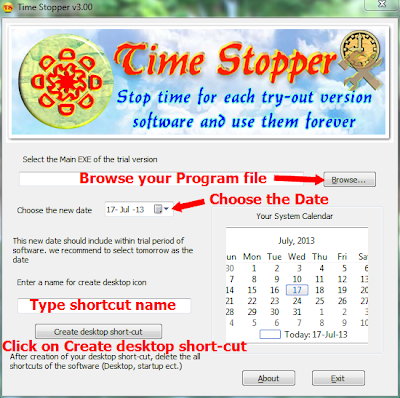
2. Now choose a date.This new date should include within trial period of the trial version software. We recommend to select tomorrow as the date.
3. Now you will able to create a desktop shortcut for future use. To create a desktop shortcut type the shortcut name and click on create desktop shortcut and use these shortcut to open the trial version software.
Note: After patching the trial version software by using Time Stopper, you must always use the desktop shortcut which created by Time Stopper to open that software otherwise the trial will end instantly.
9. Time Stopper alternatives
We can use Run As Date to run trial software. It is a portable software and similar to Time Stopper.You may also read: Top 5 ways to use trial version software forever.
10. Summary
Time stopper - Stop time for each try-out version software and use them forever.Feedback:
If you have any suggestion or doubts or problem, Just comment in below.
Try it yourself to enjoy Time Stopper.
Top 5 ways to use trial software forever
 Top 5 ways to use trial software forever is a useful tips to make trial version software to full version software. Trial version software mostly comes with one month or a few days trial period and will expire after that. But you can stop that expiration of the trial version software and use that trial version software forever.You can tell trial version of the software to not count days or time then the trial version software keep working like original software forever and will not expire or cease to work
In this awesome cool tips, which will help you to use trial version software forever
Contents
- 1.How does these Trial Version Software Work?
- 2.Use trial version software by using Run As Date.
- 3.Use trial version software by using Time Stopper.
- 4.Use trial version software by reset date and time.
- 5.Use trial version software by backup registry and restore it.
- 6.Use trial version software by using a third-party uninstaller.
- 7.Summary.
1. How does these Trial Version Software Work?
When we install trial version software in our computer system; then it make an entry of details like installation date, time etc. in our systems registry. So when we run this trial version software then it compare the current date and time with the date and time in the registry. So thus after trial period, the trial version software block the user from accessing the particular trial version software.2. Use trial version software by using Ran As Date
Run As Date is a portable utility software that allows you to run a program or software in the date and time that you specify. The advantage of Run As Date is that it doesn't change the system date and time but it will only inject the date and time into the desired application.**Steps to use run as date:
1. User left click on "Browse... (push button)" in "RunAsDate". Browse your installed trial version software in --> windows drive >> Program Files >> then find out your installed trial version software and choose that .exe file which will run your program.
2. Now choose a date and time. This new date should include within trial period of the trial version software. We recommend to select tomorrow as the date.
3. Now you will able to create a desktop shortcut for future use. To create a desktop shortcut type the shortcut name and click on create desktop shortcut or click on Run push button to open the trial version software.
Download RunAsDate:
***Download RunAsDate
***Download RunAsDate for x64
3. Use trial version software by using Time Stopper.
Time Stopper will stop the trial time when it is used. If the trial period has already ended, it is of no use to use Time Stopper as it will not be able to reverse the time.Using Time Stopper is quite easy just follow these easy steps to use trial version software forever.
1. User left click on "Browse... (push button)" in "Time Stopper". Browse your installed trial version software in --> windows drive >> Program Files >> then find out your installed trial version software and choose that .exe file which will run your program.
2. Now choose a date.This new date should include within trial period of the trial version software. We recommend to select tomorrow as the date.
3. Now you will able to create a desktop shortcut for future use. To create a desktop shortcut type the shortcut name and click on create desktop shortcut and use these shortcut to open the trial version software.
Note: After patching the trial version software by using Time Stopper, you must always use the desktop shortcut which created by Time Stopper to open that software otherwise the trial will end instantly.
Download Time Stopper 4.02:
***Download Time Stopper
You may like: Time Stopper - Download and Using Process
4. Use trial version software by reset date and time
To use trial version software forever, Change the date to future time before the installation of trial version software.After installation, you will reset the date. Then use trial version software forever.
Note: Some program will not support changing date and time manually in this case you will use Time Stopper or RunAsDate.
5. Use trial software by backup registry
If you haven't installed the software yet and you're sure that the software uses the Windows Registry to save its licensing information, you can backup the registry and then restore it when the software is about to expire.May you like: Back up windows registry and restore it without any software
6. Use trial software by using a uninstaller
You can uninstall the trial software using the third-party uninstaller; which will delete all the registry entries and files created by the trial software. You may try out some free apps like Revo Uninstaller, Glary Utilities, Geek Uninstaller, Total Uninstall, Your Uninstaller or Absolute Uninstaller Download Absolute Uninstaller and install it then uninstall the trial version software by using third-party uninstaller then re-install the trial version software and enjoy it.7. Summary
Now use trial version software without purchasing it or use longer duration before actually purchasing it. So enjoy trial version software forever without expiration.Feedback:
If you have any suggestion or doubts or problem, Just comment in below.
Try it yourself to enjoy trial version software.
Create your own screensaver easily.
এই পোষ্ট বাংলায় দেখতে ইংরেজী সেন্টেন্সের উপর মাঊস পয়েন্ট রাখুন >>>
I bless you all were friends, looking for a software. Which you choose according to your screen saver makes your desktop with animated
who can different levels. Animated Screen saver Maker software name is only 10.8 MB. Win rar to extract from the first download and install this. To obtain a serial key when it extracts the registration. How do you take it once was. Double-click the desktop icon to install the software is open, then you will like the image below -------
I bless you all were friends, looking for a software. Which you choose according to your screen saver makes your desktop with animated
who can different levels. Animated Screen saver Maker software name is only 10.8 MB. Win rar to extract from the first download and install this. To obtain a serial key when it extracts the registration. How do you take it once was. Double-click the desktop icon to install the software is open, then you will like the image below -------
To download>>> Click Here

1. Here you can select the project.
2. Here you can select the image you want to keep the Screen saver
3. You want to select a type of animation
4. Create Screen saver click you can install a screen saver image as your nomination.
5. Here you can animation a different manner.Friends that like to see it.
What are you taking from the community. Do not forget to tell me.
Free downloads most useful 90 Software.
উইন্ডোজের সেরা ৯০টি ফ্রী সফটওয়্যার। আশাকরি আপনাদের কাজে লাগবে। আপনার পছন্দের সফটওয়্যারটি ডাউনলোড করে নিন >>>
Antivirus Software:
 | avast! Free Antivirus ভাইরাস এবং ট্রোজানের বিরুদ্ধে সুরক্ষা দিতে এক্সপার্ট। ডাউনলোড |  | AntiVir Free Version লাইটওয়েট এবং সলিড। ভাল রেটিং আছে। দেখতেও মোটামুটি। ডাউনলোড |
 | Microsoft Security Essentials সিম্পল, হালকা পাতলা এবং হেভি প্রোটেক্টিভ একটা সুট। অনেকেই পেইড এন্টিভাইরাসগুলোর সাথে খুবই ভালভাবে পাল্লা দিতে সক্ষম। ডাউনলোড |  | Comodo Internet Security ফ্রী সিকিউরিটি সুট, একই সাথে ফায়ারওয়াল এবং এন্টিভাইরাস প্রোটেকশন। ডাউনলোড |
 | AVG Antivirus Free Edition এভাস্ট এবং এভিরার মত ততটা ভাল না হলেও মোটামুটি চলনসই। আর সবচেয়ে জনপ্রিয় ফ্রী এন্টিভাইরাস। ডাউনলোড Malware Remover : |
 | Spybot S&D যেকোন এন্টিভাইরাসের সাথে মিলেমিশে একসাথে স্পাইওয়্যার ডিটেক্ট করে এবং রিমুভ করে। ডাউনলোড |  | Malwarebytes’ Anti-Malware সহজ ইন্টারফেস, সিম্পল এবং কার্যকরী এন্টি ম্যাল ওয়্যার এপ্লিকেশন। ডাউনলোড |
 | IObit Security 360 Free এডভান্সড স্পাইওয়্যার এবং ম্যালওয়্যার রিমুভাল ইউটিলিটি। ডাউনলোড Firewall Tools: |
 | PC Tools Firewall Plus 6 এক্সিলেন্ট ফায়ারওয়াল, খুবই কার্যকরী প্রোটেকশন দিতে সক্ষম। ডাউনলোড |  | Comodo Firewall (standalone) অনেকদিন ধরেই এটাকে সেরা ফ্রী ফায়ারওয়াল টুলস হিসেবে গণ্য করা হয়। ডাউনলোড |
 | Online Armor Free সাধারণ একটা ফায়ারওয়ালের সব ফিচার তো আছেই, বলা যায় আরও বেশি কিছুই আছে। ডাউনলোড |  | Ashampoo FireWall Free খুবই সহজ একটা নেভিগেশন ইন্টারফেস সম্পন্ন। মাঝামাঝি ইউজারদের জন্য খুবই ভাল জিনিস। ডাউনলোড |
 | ZoneAlarm Free Firewall এডভান্সড ইউজারদের জন্য সবচেয়ে ভাল ফায়ারওয়াল প্রোটেকশন দিতে সক্ষম। ডাউনলোড |

 | Auslogics Disk Defrag সিম্পল, রিলায়েবল এবং ফাস্ট। একটা মস্ট হ্যাভ পিসি টুল। অনেকের মতেই নাম্বার ওয়ান টুল। ডাউনলোড |  | Defraggler আরেকটা অসাধারণ ডিফ্যাগমেন্ট টুলস। পোস্টেবল, ইন্সটল করার ঝামেলা নেই। ডেভেলপার হিসেবে আছে জনপ্রিয় সফটওয়্যার সিক্লিনারের ডেভেলপাররা।ন ডাউনলোড |
 | IObit Smart Defrag ব্যবহার করা খুবই সহজ। সবসময় ব্যকগ্রাউন্ডে কাজ করতে থাকে। ডাউনলোড File Recovery: |
 | Recuva ডিলেটেড ফাইলগুলা রিস্টোর করার জন্য খুবই কার্যকর। এবং জনপ্রিয়ও বটে। ডাউনলোড |  | FreeUndelete খুব বেশি অপশন নেই, কিন্তু নিজের কাজের বেলায় খুবই এক্সপার্ট। ডাউনলোড |
 | ADRC Data Recovery Software রেকুভার মত এতটা জনপ্রিয় না হলেও এর নিজের ইউজারবেস এবং ফ্যান সংখ্যা খুব একটা কম না। ডাউনলোড Uninstaller: |
 | Revo Uninstaller Free যে কোন কিছু আনইন্সটল করার কাজে খুবই দ্রুত এবং কার্যকরী। এই কাজের জন্য জনপ্রিয় একটা বাছাই। ডাউনলোড |  | IObit Uninstaller এই জগৎএ বাচ্ছাই বলা যায়। জনপ্রিয়তা পাচ্ছে আস্তে আস্তে। এমন কিছু ফিচার আছে যা অন্য আনইন্সটলারে নেই। ডাউনলোড |
 | Absolute Uninstaller অন্যদুটোর চেয়ে কম জনপ্রিয়। তবে এটার ইন্টারফেস অনেক সহজ। ডাউনলোড Backup: |
 | Mozy স্মার্ট, হাইলি সিকিউরড এবং set-it-and-forget-it ব্যাকআপ সলুশন। এটা অনলাইনে ডাটার ব্যাকআপ রাখে। ডাউনলোড |  | FBackup এটা ফাইল, ডকুমেন্ট, পার্সোনাল সেটিংস এবং প্লাগইনগুলোর ব্যকআপ নিয়ে থাকে। ডাউনলোড |
 | Clonezilla এটা একটা লাইভসিডি, যেটা দিয়ে আপনি আপনার পুরো হার্ডডিস্কের ক্লোন তৈরী করতে পারবেন। ডাউনলোড |  | SyncBack Freeware সিলেক্টিভ সিন্ক্রোনাইজেশন। লোকাল এর পাশাপাশি যেকোন এফটিপি সার্ভারে রিমোট ব্যকআপও নিতে পারবেন। ডাউনলোড |
 | Todo Backup পুরো অপারেটিং সিস্টেম, প্রোগ্রাম সেটিংস, ব্রাউজার ডাটা, ইমেইল এবং অন্যান্য ডাটা ব্যকআপ নিতে সক্ষম। ডাউনলোড System Maintanance: |
 | Glary Utilities ১৫ টির উপর কার্যকরী টুলসের একটা বাইন্ডিং এটা, অনেকজায়গা থেকেই অনেকবার রিকমেন্ড করা হয়েছে। ডাউনলোড |  | CCleaner সবমিলিয়ে খুবই হাই স্কোরিং একটা সফটওয়্যার এটা। এসময়ের সবচেয়ে জনপ্রিয় বাছাই এই ক্যাটেগরিতে। অন্যগুলোর মত অবশ্য এত বেশি ফিচার নেই। ডাউনলোড |
 | IObit Toolbox এই ফ্রী ইউটিলিটিটার মাঝে যত সংখ্যক সিস্টেম মেইনটেনেস্ট টুলস আছে তা সত্যিই আশ্চর্যজনক। ডাউনলোড Browsers: |
 | Google Chrome সবচেয়ে দ্রুতগতির এবং মিনিমাল ডিজাইনের ব্রাউজার। এখন এটার সাথে এক্সটেনশন সাপোর্টও যোগ হয়েছে। ডাউনলোড |  | Firefox এর আছে ৬০০০+ এডঅনের এক বিশাল গ্যালারী। সবরকম ফিচারই এটায় এড করা সম্ভব। এখন পর্যন্ত সবচেয়ে বেশি কাস্টমাইজেবল ব্রাউজার এটা। ডাউনলোড |
 | Opera এখন পর্যন্ত সবচেয়ে বেশি ফিচার সম্পন্ন এবং এডভান্সড ব্রাউজার হচ্ছে ওপেরা। ডাউনলোড Email: |  | Safari এটা মূলত ম্যাকের জন্য বানানো হলেও উইন্ডোজে অনেকেরই প্রিয় ব্রাউজার এটা। সাথে এক্সটেনশন সাপোর্টও আছে। ডাউনলোড |
 | Thunderbird এটা এমনিতেই জনপ্রিয়, তারউপর দিনদিন আরও বেশি জনপ্রিয় হচ্ছে। আমার মতে যে কোন প্ল্যাটফর্মে সেরা মেইল ক্লায়েন্ট এটা। ডাউনলোড |  | Postbox Express সিম্পল, কিন্তু শক্তিশালী এবং উইন্ডোজের জন্য খুবই নতুন একটা মেইল ক্লায়েন্ট। ডাউনলোড |
 | Google Notifier এটা জিমেইলে নতুনকোন মেইল এলে আপনাকে নোটিফাই করবে। ডাউনলোড Communication: |
 | Skype সবচেয়ে জনপ্রিয় ক্রস প্ল্যাটফরম ভিওআইপি এপ্লিকেশন। আপনি যদি অনলাইনে থাকেন তবে আপনার জন্য আবশ্যিক একটা এপস। ডাউনলোড |  | Pidgin সহজে ব্যবহার যোগ্য, ক্রস প্ল্যাট ফরম এবং মাল্টি প্রটোকল চ্যাট ক্লায়েন্ট। বেশিরভাগ চ্যাট প্রটোকলগুলোই সাপোর্ট করে। ফেসবুক চ্যাটও করতে পারবেন এটা দিয়েই। ডাউনলোড |
 | Digsby মাল্টি প্রটোকল আইএমের জন্য আরেকটা অল্টারনেটিভ। এটাও ক্রস প্ল্যাটফরম, জনপ্রিয়ও। ডাউনলোড Photo Instrument: |
 | Paint.NET একেবারে নতুনদের জন্য ফটোশপের শক্তিশালী সাবস্টিটিউট। ডাউনলোড |  | FastStone Image Viewer সেরা ইমেজ ভিউয়ারগুলোর মাঝে এটা একটা। একই সাথে কনভার্টার এবং এডিটরও বটে। ডাউনলোড |
 | IrfanView ইমেজ ভিউয়ার বা এডিটর হিসেবে এটাকে সুইস আর্মি নাইফ বলা যেতে পারে। অস্বাভাবিক জনপ্রিয় একটা টুলস। ডাউনলোড |  | Google Picasa আমার দেখা সবচেয়ে পাওয়ারফুল ফটো ম্যানেজার। গুগলের জিনিস মানেই নাম্বার ওয়ান। এটার সাথে আছে ওয়ান ক্লিক ফটো রিটাচিং, ইজি অনলাইন ফটো শেয়ারইল সহ নানা রকম সুবিধা। ডাউনলোড |
 | GIMP খুবই ফিচার বহুল ফটোশপ লাইক ফটো এডিটর। এটাকে ফটোশপের ফ্রী অল্টারনেটিভ হিসেবে গণ্য করা হয়। ডাউনলোড Audio: |  | PhotoScape আরেকটা ভাল ফটো এডিটিং এপ্লিকেশন। ডাউনলোড |
 | foobar2000 উইন্ডোজের জন্য হাইলি কাস্টমাইজেবল একটা অডিও প্লেয়ার। ডাউনলোড |  | Songbird মজিলার কোডের উপর নির্মিত জনপ্রিয় মিউজিক প্লেয়ার। এটায় ফায়ারফক্সের মত এডঅনের সাপোর্টও আছে। ডাউনলোড |
 | Audacity সাউন্ড রেকর্ডিং এবং এডিটিং এর জন্য খুবই জনপ্রিয় ওপেনসোর্স সফটওয়্যার। ডাউনলোড |  | iTunes মিউজিক প্লেয়ার এবং ভিডিও লাইব্রেরী অর্গানাইজার। এটা দিয়ে আপনি আইটিউনস স্টোরেও কানেক্ট করতে পারবেন। ডাউনলোড |
 | MediaMonkey ফুল ফিচার্ড মিউজিক প্লেয়ার এবং মিউজিক কালেকশন অর্গানাইজার। ডাউনলোড |  | Winamp পরিচিত, লাইটওয়েট মিউজিক প্লেয়ার। ডাউনলোড |
 | CopyTrans Manager অল্টারনেটিভ আইপড ম্যানেজার এপ্লিকেশন। আইপড, আইফোন এবং আইপ্যাড থেকে মিউজিক ট্রান্সফার এবং সিঙ্কিং করে। ডাউনলোড Video : |
 | VLC Media Player খুবই জনপ্রিয় ক্রস প্ল্যাটফর্ম ভিডিও এপ্লিকেশন। এটা বেশিরভাগ ফরম্যটের ভিডিওই চালাতে সক্ষম। ডাউনলোড |  | Handbrake ওপেনসোর্ট, ক্রস প্ল্যাটফর্ম, মাল্টি থ্রেডেড ভিডিও ট্রান্সকোডার এবং কনভার্টার। ডাউনলোড |
 | VirtualDub ওপেনসোর্স এবং পোর্টেবল ভিডিও এডিটর। ডাউনলোড |  | Media Player Classic উইন্ডোজ মিডিয়া প্লেয়ারের একটা রেপ্লিকা। শুধুমাত্র বেসিক কন্ট্রোল অপশন গুলা আছে। অনেকগুলো ফরম্যাট প্লে করতে পারে। ডাউনলোড |
 | Freemake সহজে ব্যবহার যোগ্য এবং ফ্রী ভিডিও কনভার্টার এবং ডিভিডি বার্নার। ডাউনলোড Documents: |
 | OpenOffice মাইক্রোসফট অফিসের জনপ্রিয় এবং ফ্রী বিকল্প। ডাউনলোড |  | Dropbox সবার জন্যই আবশ্যিক একটা এপ্লিকেশন। ইন্টারনেটে বা অন্য পিসি্ম্যাকের সাথে ফোল্ডার সিন্ক্রোনাইজেশন করে। শেয়ার্ড ডকুমেন্টের সুবিধাও আছে। ডাউনলোড |
 | Notepad++ জনপ্রিয় ওপেনসোর্স টেক্সট এডিটর। মূলত প্রোগ্রামারদের কাছে এটা খুবই এবং খুবই জনপ্রিয় ডাউনলোড |  | FoxIt Reader এডোবরিডারের খুবই হালকা পাতলা একটা বিকল্প। পিডিএফ ফাইল ওপেন করে। ডাউনলোড |
 | doPDF যেকোনো উইন্ডোজ প্রোগ্রাম থেকে মাত্র দুই ক্লিকে যেকোন ডকুমেন্ট এবং পিকচারকে পিডিএফ এ কনভার্ট করে। ডাউনলোড Document: |
 | Fences ডেস্কটপ আইকনগুলোকে ভিউজিয়ালি অর্গানাইজ করার জন্য কনটেইনার সৃষ্টি করে। ডাউনলোড |  | Rainlender উইন্ডোজ ডেস্কটপের জন্য খুবই সহজে ব্যবহারযোগ্য এবং লাইওয়েট ক্যালেন্ডার। ডাউনলোড |
 | Evernote আপনার আইডিয়াগুলোকে অন দা গো সেভ করে রাখুন, যে কোন জায়গা থেকে নোট নিন। এবং নোটগুলোকে ওভার ইন্টারনেট যেকোন জায়গা থেকে একসেস করুন। হাইলি রিকমেন্ডেড। ডাউনলোড |  | VirtuaWin আপনার কাজকে গ্রুপিংয়ের জন্য মাল্টিপল ভার্চুয়াল ডেস্কটপ তৈরী করে। হাইলি কাস্টমাইজেবল। ডাউনলোড |
 | Launchy পাওয়ারফুল, কী স্ট্রোক বেজড লঞ্চার। স্টার্ট বাটনকে রিপ্লেস করে। ডাউনলোড Archive Manager: |
 | 7-zip আপনার সবধরণের এক্সট্র্যাক্ট/কমপ্রেশনের কাজের জন্য যথপযুক্ত। ডাউনলোড |  | Universal Extractor ৫০ টার উপর ফাইল ফরম্যাট সাপোর্ট সহ ইউনিভার্সাল এক্সট্রাক্টর সুপার একটা জিনিস। ডাউনলোড |
 | IZArc সব আর্কাইভ নিয়ে কাজ করার জন্য একটা ইউটিলিটি। প্রায় সবধরণের ফরম্যাটই সাপোর্ট করে। ডাউনলোড CD DVD Tools |
 | ImgBurn CD/DVD/HD-DVD/Blu-ray বার্ণিং এপ্লিকেশন। সিডি এবং ডিভিডি থেকে ইমেজ ফাইলও বানাতে পারবেন। ডাউনলোড |  | CDBurnerXP নীরো বার্নিং রমের সবচেয়ে জনপ্রিয় ফ্রী অল্টারনেটিভ। CD, DVD, Blu-Ray এবং HD-DVD বার্ণ করে। ডাউনলোড |
 | bitRipper আপনার ডিভিডিকে AVI ফাইল বাMpeg হিসেবে হার্ডডিস্কে ব্যাকআপ রাখে। ডিভিডির জন্য খুবই ভাল একটা ব্যকআপ টুল। ডাউনলোড |  | CDex ওপেনসোর্স ডিজিটাল অডিও সিডি এক্সট্র্যাক্টর। সিডি ট্র্যাকগুলোকে এমপিথ্রি হিসেবে সেভ করে। ডাউনলোড |
 | DuBaron CD2ISO সিডি এবং ডিভিডি থেকে আইএসও ইমেজ এক্সট্র্যাক্ট করার জন্য খুবই ভাল একটা টুলস। সিম্পল এবং সহজে ব্যবহার যোগ্য। ডাউনলোড |  | Virtual CloneDrive আইএসও ইমেজ (CD/DVD images) ফাইলগুলোকে ওপেন এবং প্লে করার জন্য একটা ভার্চুয়াল ড্রাইভ মাউন্ট করে। ডাউনলোড |
 | DVDShrink সবচেয়ে সহজ এবং বেটার ফ্রী ডিভিডি রিপিং এবং ব্যাকআপ টুল। ডাউনলোড Downloader: |
 | uTorrent স্পীডি, এফিশিয়েন্ট এভল ফ্রী। সবচেয়ে জনপ্রিয় বিটটরেন্ট ক্লায়েন্ট। ডাউনলোড |  | Deluge অসাধারণ একটা ক্রসপ্ল্যাটফরম বিটরেন্ট ক্লায়েন্ট। ডাউনলোড |
 | YouTube Downloader HD মাউসের কয়েকটা ক্লিকেই ইউটিউব ভিডিও ডাউনলোড করে ফেলে। ডাউনলোড Others: |
 | LastPass ব্রাউজারগুলোতে পাসওয়ার্ড স্টোর এবং সিনক্রোনাইজেন করার জন্য নিরাপদ প্লাগইন। ডাউনলোড |  | Unlocker অপ্রয়োজনীয় প্রোগ্রাম বা সিস্টেম প্রসেসকে কিল করে বা আনলক করে। ডাউনলোড |
 | PortableApps Suite প্রয়োজনীয় পোর্টেবল এপসগুলোর এক বিরাট কালেকশন। যেকোন কিছুতে করে আপনার এপসগুলোকে বহন করতে পারবেন। ডাউনলোড |  | TreeSize Free আপনার মূল্যবান হার্ডডিস্ক স্পেস কোথায় গেলো তা দেখানোই এর কাজ। ডাউনলোড |
 | EASEUS Partition Master অল-ইন-ওয়ান পার্টিশন ম্যানেজার। পার্টিশন বানানো, রিসাইজ,এবং মার্জ করুন খুবই সহজে। ডাউনলোড |  | TrueCrypt ফ্রী ওপেন সোর্স ক্রস প্ল্যাটফর্ম ডিস্ক এনস্ক্রিপশন সফটওয়্যার। সেনসিটিভ ফাইলগুলোকে তালা মেরে দিন এবং লুকিয়ে ফেলুন। ডাউনলোড |
 | Soluto অপ্রয়োজনীয় এপ্লিকেশনগুলোকে স্টার্টআপ থেকে সরিয়ে উইন্ডোজের বুটআপ টাইম দ্রুত করে। খুবই কার্যকরী। ডাউনলোড |
Subscribe to:
Posts
(
Atom
)